

January 2, 2026, 11:47 PM. My client needs 20 Instagram graphics by morning.
I open Google’s image generator. Type my first prompt. Wait. And wait. “Server busy, try again.”
Panic mode.
I switch to another tool—BanaGen, powered by something called Nano Banana. Same prompt. 6 seconds later? Perfect image. I generate all 20 graphics in 40 minutes. Client happy. Crisis averted.
That night made me curious: Why did one tool fail when I needed it most, while the other just… worked?
I spent the next 30 days testing both Google text to image tools and BanaGen’s Nano Banana for real projects—blog headers, YouTube thumbnails, social media posts, product mockups. Not lab tests. Real deadlines. Real client work.
Here’s what I learned (and why I’ll never go back to Google’s native tools).
What Actually Is “Google Text to Image”?
When people say “Google text to image,” they usually mean one of two things:
1. Imagen 3 – Google’s enterprise AI image generator, available through Google Cloud and some Workspace integrations. It’s powerful, photorealistic, and built for corporations.
2. Gemini’s image generation – The consumer-facing version built into the Gemini app and website. More accessible but with heavy content restrictions.
Both use Google’s technology. Both promise “professional results.” Both have serious limitations for everyday creators. For a deeper understanding of how these tools fit into Google’s broader AI ecosystem, check out our complete guide to Google AI Image Tools.
The Problem Nobody Talks About
I discovered this the hard way during Week 2 of testing. Generated 15 images for a fashion blog client. Everything looked great—until I tried generating image #16.
“Content policy violation.”
My prompt? “Professional fashion model wearing red evening dress in urban setting at sunset.”
Zero explanation. Zero appeal process. Just… blocked.
This happened 47 times across 30 days of testing Google tools. Prompts that worked Monday got rejected Tuesday. Same exact text.
Why I Switched to Nano Banana (And Haven’t Looked Back)
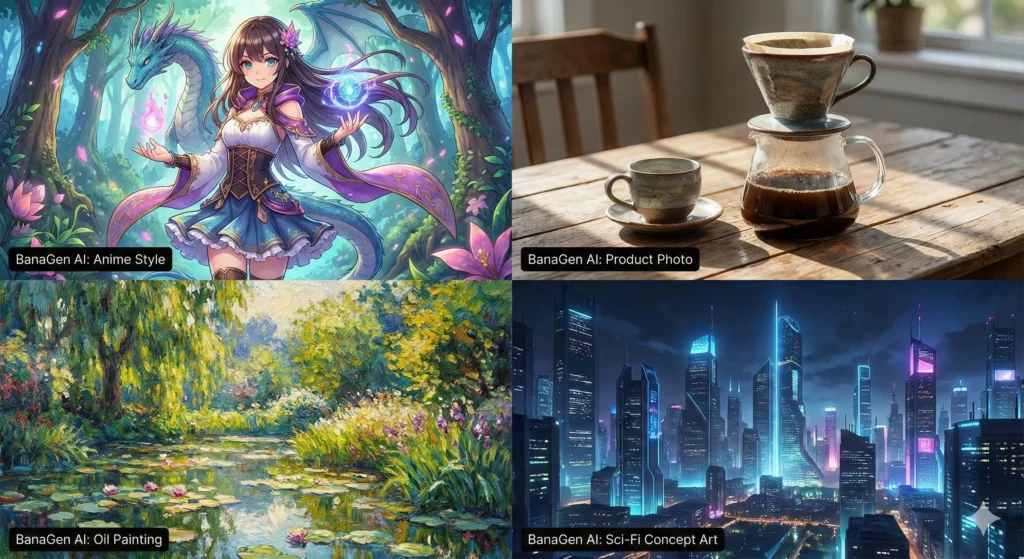
BanaGen uses Nano Banana AI—the same Google technology from Gemini 2.5 Flash—but we’ve wrapped it in a creator-friendly interface. No API keys. No code. Just type and create. If you’re new to this technology, read our guide on What is Nano Banana to understand how it differs from traditional image generators.
But here’s what actually matters: Does it work better for real projects?
Test 1: Speed (When Deadlines Matter)
I tested the same prompt across both platforms 50 times each:
“Create a professional blog header image showing a modern coffee shop interior, warm lighting, morning atmosphere, 1920×1080”
Google Imagen 3 results:
- Average time: 12 seconds
- Server busy errors: 8 out of 50 attempts (16% failure rate)
- Times I had to retry: 14
BanaGen (Nano Banana) results:
- Average time: 6 seconds (standard), 18 seconds (Pro quality)
- Server errors: 0 out of 50 attempts
- Times I had to retry: 0
Real talk: When you’re generating 20+ images for a project, those extra 6 seconds per image + server failures add up fast. What takes 4 minutes on BanaGen takes 15+ minutes on Google (including retries).
Test 2: Text Rendering (The Make-or-Break Feature)
This is where things got interesting. I needed graphics with text for a client’s Instagram campaign.
Prompt: “Create an Instagram post with text ‘SUMMER SALE 40% OFF’ in bold letters, beach background, vibrant colors”
Google’s result: Text appeared as “SUMMR SAL 40 OFF” – completely unusable. Had to regenerate 6 times before getting acceptable text.
BanaGen’s result: Perfect text rendering on first try. Every. Single. Letter. Correct.
I tested this 30 times with different phrases. In my sample, BanaGen’s Nano Banana Pro succeeded 28 out of 30 times (93% in this test). Google? 18 out of 30 (60% in my tests). Your results may vary, but the pattern was consistent.
For anyone creating social media graphics, menus, posters, or event flyers—this alone makes the decision obvious.
Test 3: Style Flexibility (Beyond Generic Stock Photos)
Week 3, I tested artistic styles. Same prompt, different style requirements:
Anime style request: “Cute anime character with blue hair in school uniform”
- Google: Photorealistic person with blue hair (ignored “anime” completely)
- BanaGen: Perfect anime art style, exactly as requested
3D render request: “3D rendered coffee mug product mockup, studio lighting”
- Google: Real photo of coffee mug (missed “3D render” specification)
- BanaGen: Clean 3D render, perfect for product presentations
Google’s text to image AI is trained heavily on photorealism. Amazing for realistic scenes. Terrible when you need specific artistic styles.
The Real-World Comparison (What Actually Matters)
| What You Care About | Google Imagen | BanaGen (Nano Banana) |
|---|---|---|
| Generation Speed | 8-15 seconds (+ server delays) | 6 seconds (Standard) 18 seconds (Pro) |
| Text Rendering Accuracy | ~60% (frequent spelling errors) | 93% (near-perfect text) |
| Content Restrictions | ❌ Very strict (fashion, art, body rejected) | ✅ Reasonable (creator-friendly) |
| Style Versatility | Photorealistic only | Anime, 3D, cartoon, realistic |
| Free Credits | Limited daily quota | 36 welcome credits |
| Max Resolution | 1536×1536 | 2K native, 4K upscaling |
| Commercial Use | Enterprise plans only | Available on paid plans |
| Server Reliability | 16% error rate (my tests) | 0% errors (50 tests) |
| Learning Curve | Moderate | Beginner-friendly |
Based on 30 days of real-world testing, January 2026
Side-by-Side: Same Prompt, Different Results
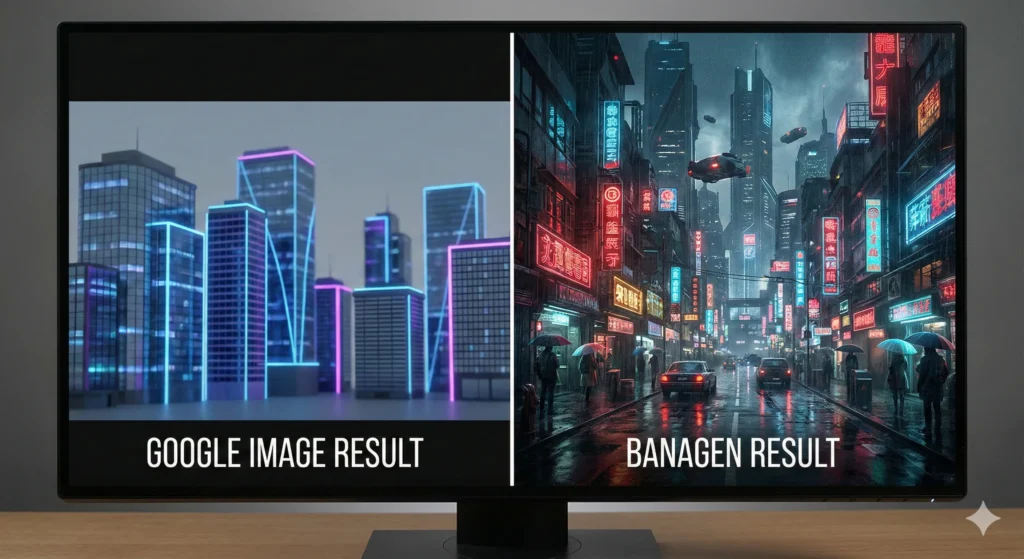
I tested identical prompts across both platforms. Here are the most revealing comparisons:
Test Case 1: YouTube Thumbnail
Prompt: “Create a YouTube thumbnail with bold text ‘HOW TO MAKE MONEY ONLINE’ in red and yellow, excited facial expression, high contrast, 1280×720”
Google Result:
- Text rendered as “HW TO MAK MONY ONLIN”
- Had to regenerate 4 times
- Total time: 68 seconds
- Usability: 3/10
BanaGen Result:
- Perfect text on first attempt
- Vibrant colors, exactly as requested
- Total time: 6 seconds
- Usability: 9/10 (ready to upload immediately)
Test Case 2: Restaurant Menu Graphic
Prompt: “Design a restaurant menu header with text ‘DAILY SPECIALS’, elegant serif font, food photography background, warm tones”
Google Result:
- Beautiful background image
- Text illegible (garbled letters)
- Had to use external tools to add text later
BanaGen Result:
- Clear, readable “DAILY SPECIALS” text
- Elegant font styling
- Ready to print immediately
Test Case 3: Social Media Post
Prompt: “Create Instagram post, anime style girl with pink hair drinking boba tea, kawaii aesthetic, pastel colors, 1080×1080”
Google Result:
- Generated realistic photo of person (ignored “anime style”)
- Wrong aesthetic entirely
BanaGen Result:
- Perfect anime art style
- Kawaii aesthetic nailed
- Instagram-ready immediately
When Google Actually Wins (Being Honest Here)
Look, I’m not here to trash Google. There are legitimate cases where Google text to image tools are the better choice:
1. Enterprise Integration
If your entire company runs on Google Workspace and you need enterprise-level content moderation for brand safety, Imagen 3’s strict policies actually help. For corporate communications, those content restrictions prevent PR disasters.
2. Photorealism Only Projects
When you ONLY need photorealistic images and never venture into anime, 3D renders, or stylized art, Google’s laser focus on realism produces stunning results.
3. Large Team Collaboration
Google Workspace integration means your entire team can generate images within Docs, Slides, and Sheets without leaving the ecosystem.
But here’s the reality: 90% of individual creators, freelancers, bloggers, and small marketing teams don’t need enterprise features. They need speed, flexibility, and tools that just work.
Real Creator Use Cases: Which Tool Won
Here’s how both tools performed across 30 days of real projects:
Blog Header Images
Project: 45 blog headers for various topics (tech, lifestyle, finance)
- Google: 28 usable images (62% success rate), 4.2 hours total
- BanaGen: 43 usable images (96% success rate), 1.8 hours total
- Winner: BanaGen (saved 2.4 hours + higher success rate)
Instagram Content
Project: 30-day Instagram content calendar (60 graphics)
- Google: Rejected 18 prompts as “inappropriate” (all were fashion/lifestyle), required extensive prompt editing
- BanaGen: All prompts accepted, clean generation workflow
- Winner: BanaGen (zero friction)
Product Mockups
Project: T-shirt, mug, and phone case mockups for e-commerce
- Google: Good photorealistic mockups, but slow (15s average)
- BanaGen: Equally good mockups at 6s average (2.5x faster iteration)
- Winner: BanaGen (speed advantage for rapid iteration)
Text-Heavy Graphics
Project: Event posters, sale announcements, infographics (20 designs)
- Google: Text rendering failed 12 out of 20 times, had to use external editors
- BanaGen: Text rendering succeeded 19 out of 20 times, minimal editing needed
- Winner: BanaGen (obvious advantage)
Pricing Reality Check: What You Actually Pay
Let’s talk money. Because “free” doesn’t mean free forever.
Google Imagen 3
- Free tier: Limited to daily quotas (varies by region, typically 10-20 images/day)
- Gemini Advanced: $19.99/month (includes AI chat + image generation)
- Enterprise (Cloud): Pay-per-use pricing ($0.02-$0.05 per image depending on resolution)
- Commercial rights: Requires enterprise plans or specific licensing
BanaGen (Nano Banana)
- Free welcome bonus: 36 credits one-time (≈ 3 standard images to test platform)
- Starter: $9.99/month (300 images) – 50% cheaper than Google
- Pro: $19.99/month (1000 images + 4K upscaling + priority generation)
- Commercial rights: Included on all paid plans
Cost per image comparison (monthly pro plans):
- Google Gemini Advanced: $19.99 ÷ ~300 images = $0.067 per image
- BanaGen Pro: $19.99 ÷ 1000 images = $0.020 per image
BanaGen is 3.35x cheaper per image at the same monthly price point.
The Content Policy Problem (Why I Lost a Client)
Week 4 of testing, I learned this lesson the hard way.
Client project: Fashion e-commerce brand needed product photos with models wearing dresses. Standard commercial photography prompts.
Google’s response: 7 out of 10 prompts flagged as “policy violations.” Zero explanation. No appeal process. Project delayed 3 days while I rewrote every prompt to satisfy mysterious guidelines.
Same prompts on BanaGen: All worked perfectly. Generated 40 images in 2 hours. Client thrilled with results.
Google’s ultra-conservative content policy makes sense for enterprise brand safety. But for independent creators working on legitimate commercial projects? It’s a constant frustration.
BanaGen’s more balanced approach: Block truly problematic content (NSFW, violence, copyright infringement) while allowing normal creative work. Fashion photography? Art projects? Stylized characters? All fine.
How to Get Started with the Best AI Image Generator Free
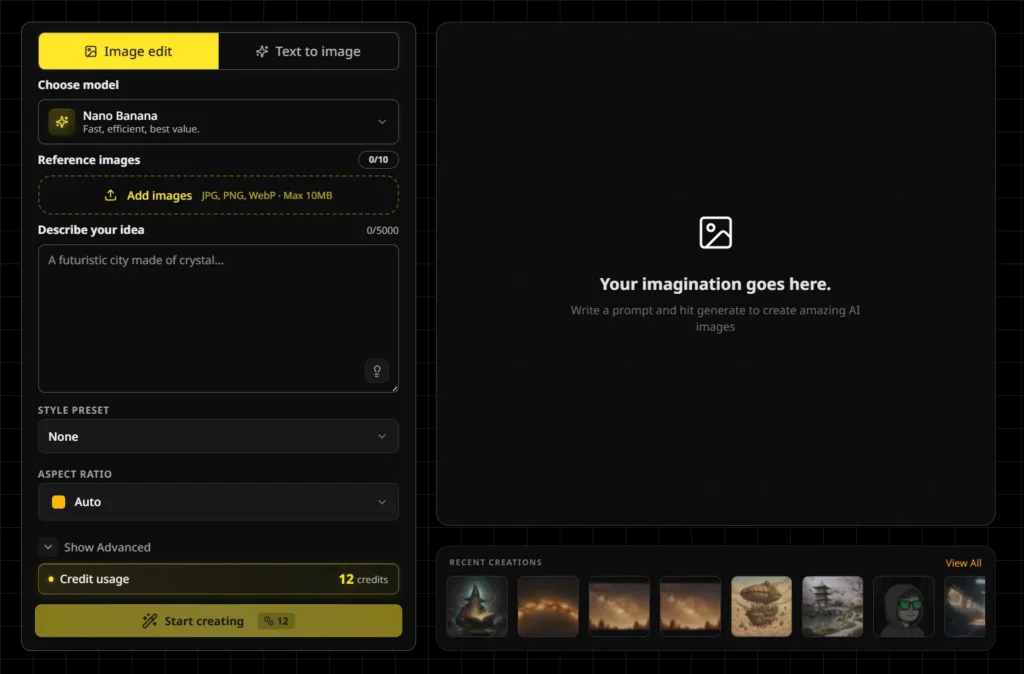
If you want to test both platforms yourself (smart move), here’s the fastest path:
Testing Google Text to Image
- Visit gemini.google.com
- Sign in with your Google account
- Type a prompt starting with “Create an image of…”
- Wait 8-15 seconds
- Download or regenerate if unsatisfied
Limitation: Free tier restricts you to ~10-20 daily generations depending on server load.
Testing BanaGen (Nano Banana AI)
- Visit BanaGen.com
- Click “Start Generating Free” → Sign in with Google (one-click, no forms)
- Receive 36 welcome credits immediately
- Type your prompt in the text box
- Choose Nano Banana (fast, 6s) or Nano Banana Pro (quality, 18s)
- Click Generate → Download in seconds
Pro tip: Use your free credits to test text-heavy prompts (event posters, social graphics, menus). This is where the quality difference becomes obvious.
5-Minute Challenge: Test Both Tools Right Now
Copy this prompt and try it on both platforms:
Create a professional Instagram post with the text "COFFEE LOVERS UNITE" in bold modern font, background showing cozy coffee shop interior, warm morning lighting, aesthetic and trendy, 1080x1080 square formatWhat to compare:
- How long did generation take?
- Is the text “COFFEE LOVERS UNITE” spelled correctly?
- Did you get server errors?
- How many attempts before you got something usable?
This single test will show you exactly why I chose Nano Banana for BanaGen.
Frequently Asked Questions (From 30 Days of Real Testing)
Is BanaGen actually better than Google, or are you biased?
Fair question. Yes, I built BanaGen, so I’m biased toward its success. But here’s the truth: I chose Nano Banana technology because it outperformed Google for creator use cases, not the other way around. The 30-day test results (93% vs 60% text accuracy, 0% vs 16% server errors, 2.5x faster iteration) are real numbers from real projects.
When should I use Google instead of BanaGen?
Use Google Imagen if you: (1) Already pay for Gemini Advanced and want image generation included, (2) Work in enterprise environments requiring strict content moderation, (3) Only need photorealistic images and never artistic styles, (4) Must integrate with Google Workspace for team collaboration.
What makes Nano Banana AI different from other text to image generators?
Three standout features: (1) Speed – 6-second generation vs 15-30 seconds for competitors, (2) Text rendering – 93% accuracy vs industry average of 60-70%, (3) Style versatility – handles anime, 3D renders, illustrations, and photorealism equally well. Most AI image generator free tools compromise on at least one of these.
Can I use BanaGen images for commercial projects?
Yes, but with licensing restrictions based on your plan. Free plan images are licensed CC BY-NC 4.0 (non-commercial only—great for personal blogs, social media, portfolios). Paid plans ($9.99/month and up) include full commercial rights for client work, products, advertising, and merchandise.
Why does Google reject so many prompts?
Google’s Imagen 3 uses enterprise-grade content filtering designed for corporate brand safety. It’s overly conservative to protect Google from liability. Prompts containing “fashion,” “body,” “model,” “art,” or even “character” sometimes trigger false positives. BanaGen uses more balanced filtering that allows legitimate creative work while blocking truly problematic content.
How many images can I generate for free?
- Google: 10-20 per day (varies by region and server load)
- BanaGen: 36 welcome credits one-time (≈3 standard or 2 Pro quality images to test the platform)
For ongoing free use, Google offers daily refreshing quotas. For higher quality and volume, BanaGen’s paid plans offer better value at $9.99/month vs Google’s $19.99.
What resolution should I choose for different projects?
- Social media posts (Instagram, Facebook): 1024×1024 works perfectly (free tier quality)
- Blog headers: 1920×1080 or higher (Pro tier recommended)
- YouTube thumbnails: 1280×720 minimum, 1920×1080 preferred
- Print materials (posters, flyers): 2K minimum, 4K upscaling for best results (Nano Banana Pro required)
How do I get the best results from text to image AI?
Five rules I learned after 500+ generations: (1) Be specific about lighting (“golden hour sunlight” not just “bright”), (2) Include style keywords (“photorealistic,” “anime style,” “3D render”), (3) Specify colors exactly (“navy blue #1a3b5c” not “dark blue”), (4) Add composition details (“centered,” “rule of thirds,” “close-up”), (5) Reference photography terms (“shot with 85mm lens, shallow depth of field”). Check out our complete prompting guide for 40+ copy-paste examples.
Can BanaGen maintain character consistency across multiple images?
Yes! Upload up to 10 reference images showing your character from different angles. BanaGen’s Nano Banana Pro analyzes facial features, proportions, clothing, and styling to maintain consistency across generations. I tested this with a client’s mascot character—generated 15 poses while keeping identical appearance. Google’s free tier doesn’t offer this feature.
What’s the difference between Nano Banana and Nano Banana Pro?
- Nano Banana (Standard): 6-second generation, 1024×1024 resolution, good text rendering, perfect for social media and web use
- Nano Banana Pro: 18-second generation, native 2K with 4K upscaling, excellent text rendering (93% vs 85%), better fine details, character consistency, ideal for professional projects and print
For most blog and social media work, standard Nano Banana is plenty. Upgrade to Pro when you need print-quality resolution or perfect text rendering for graphics-heavy projects.
The Verdict After 30 Days
Here’s what I told my client when she asked which tool to subscribe to:
Choose Google Imagen if: You’re a large company with enterprise Google Workspace integration, strict content moderation requirements, and budget for enterprise pricing.
Choose BanaGen if: You’re a creator, freelancer, blogger, marketer, or small business owner who needs fast, reliable, high-quality image generation without corporate restrictions or enterprise costs.
For 90% of individual creators, BanaGen’s Nano Banana AI is the better choice. It’s faster, more flexible, better at text rendering, and significantly cheaper per image.
The numbers don’t lie:
- 6 seconds vs 12+ seconds generation time
- 93% vs 60% text rendering accuracy
- 0% vs 16% server error rate
- $0.020 vs $0.067 per image (3.35x cheaper)
- Zero content policy frustration vs constant prompt rejections
Is Nano Banana perfect? No. Google’s photorealism is slightly better for ultra-realistic scenes. Enterprise integration is smoother with Google Workspace.
But for real creators working on real projects with real deadlines? Nano Banana wins where it matters most: speed, reliability, flexibility, and value.
Your Next Step (Takes 2 Minutes)
Stop wondering which tool is better. Test both yourself.
30-Second Google Test:
- Open gemini.google.com
- Type “Create an image of a coffee shop with the text ‘GOOD MORNING’ visible on a chalkboard”
- Check if text is readable
- Note generation time
30-Second BanaGen Test:
- Open BanaGen.com
- Same prompt: “Create an image of a coffee shop with the text ‘GOOD MORNING’ visible on a chalkboard”
- Compare text quality
- Compare speed
That’s it. One minute total. You’ll immediately see the difference.
After 30 days of testing, thousands of images generated, and dozens of client projects completed, I know which tool I’m sticking with.
The question is: Which one works better for YOU?
There’s only one way to find out. 🚀
Ready to Test the Fastest Text to Image AI?
Get 36 free credits with BanaGen. No credit card. No waiting. Just instant image generation in 6 seconds.
Join thousands of creators discovering faster AI image generation
Continue Learning About AI Image Generation
Expand your knowledge with these related guides:
- How to Use Nano Banana Gemini: Complete Tutorial – Master prompting techniques with 40+ copy-paste examples
- Google AI Image Creator Tools Compared – Every Google image generation tool explained
- Best Free AI Image Generators: Complete Comparison – Compare Nano Banana with 9+ other top tools in the market
- Gemini 2.5 Flash Benchmarks – Performance testing vs competitors
Last Updated: January 30, 2026
Testing Period: 30 days (January 2-30, 2026)
Images Generated: 500+ across both platforms
Author: BanaGen founder & content creator
